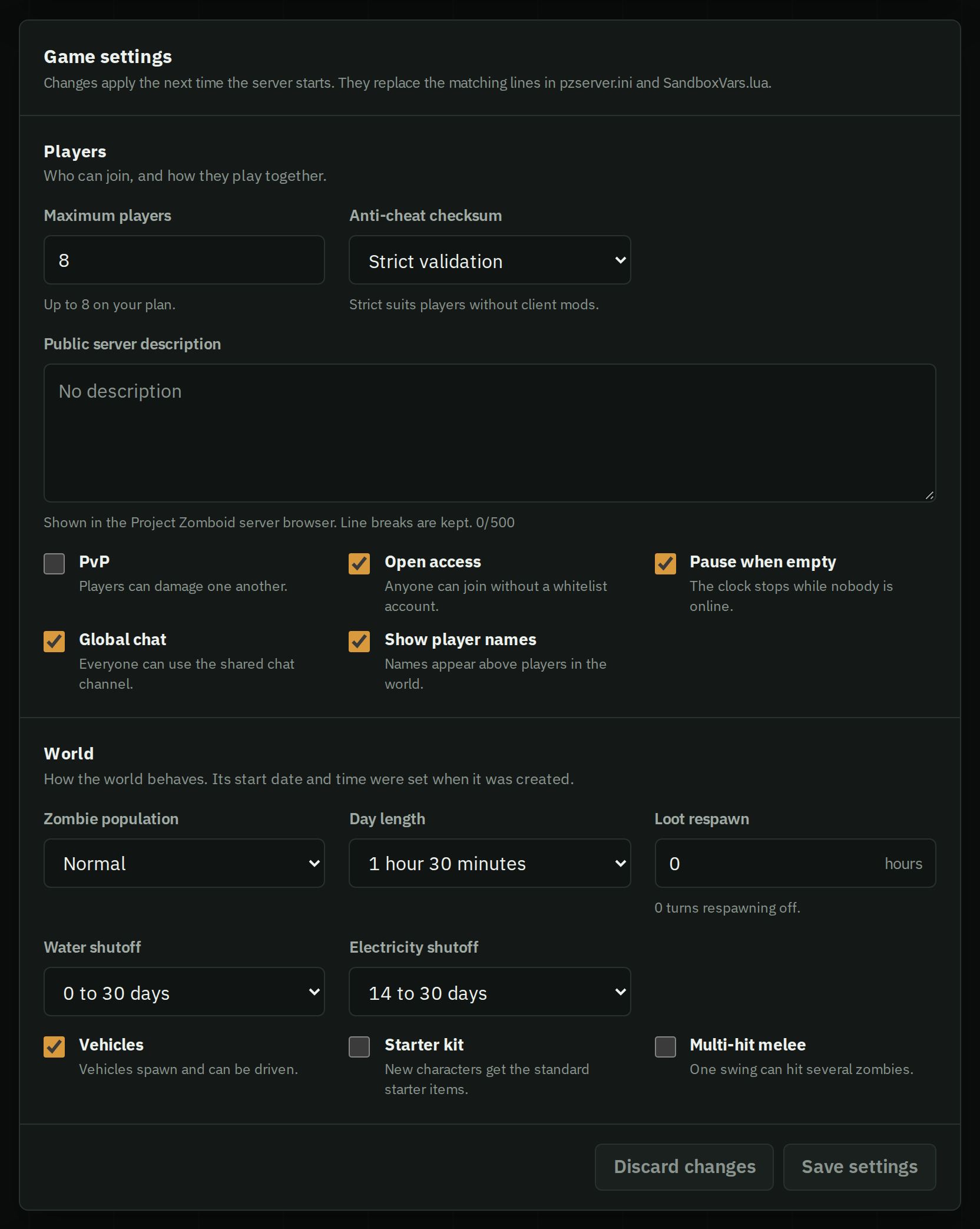
Project Zomboid server and sandbox settings explained
What the main Project Zomboid server and sandbox settings do, the file and key each one lives in, every choice with its number, and the default.
Server settings are in servertest.ini, world rules in servertest_SandboxVars.lua, both in Zomboid/Server and named after the server. Stop the server before editing; it reads them when it starts.
Sandbox values are numbered choices, not amounts: Zombies = 4 means Normal. Each setting below lists what every number means.
Server settings
Maximum players
- Key
MaxPlayersin the.inifile- Values
- A number of players
The most players who can be online at the same time.
PvP
- Key
PVPin the.inifile- Values
- true (on) or false (off)
Whether players can hurt each other.
Pause when empty
- Key
PauseEmptyin the.inifile- Values
- true (on) or false (off)
Stops the in-game clock while nobody is online, so the world does not age, food does not rot and the shutoffs come no closer while the server is empty.
Public server name
- Key
PublicNamein the.inifile- Values
- Text
The server's name in the in-game server browser.
Public server description
- Key
PublicDescriptionin the.inifile- Values
- Text
- HostForge default
- Empty
The description shown with the server in the in-game browser.
Visibility
- Key
Publicin the.inifile- Values
- true (on) or false (off)
- HostForge default
- Off (false)
Lists the server in the game's public server browser. When it is off, players join with the IP address and port.
Global chat
- Key
GlobalChatin the.inifile- Values
- true (on) or false (off)
- HostForge default
- On (true)
Lets players use the chat channel everyone on the server reads. Local chat, heard by players nearby, works either way.
Open access
- Key
Openin the.inifile- Values
- true (on) or false (off)
- HostForge default
- On (true)
Lets anyone join and create an account the first time they connect. When it is off, only accounts on the server's whitelist can join, and an admin adds them.
Show player names
- Key
DisplayUserNamein the.inifile- Values
- true (on) or false (off)
- HostForge default
- On (true)
Shows each player's name above their character.
Anti-cheat checksum
- Key
AntiCheatChecksumin the.inifile- Values
- 0 Off · 1 Compatibility warnings · 2 Strict validation
- HostForge default
- Strict validation (2)
What the server does when a player's game files differ from its own: nothing, a warning, or refusing them. Strict validation suits groups that play without client-side mods.
Sandbox settings
Zombie population
- Key
ZombiesinSandboxVars.lua- Values
- 1 Insane · 2 Very high · 3 High · 4 Normal · 5 Low · 6 None
- HostForge default
- Normal (4)
How many zombies the world spawns. Lower numbers mean more zombies: 1 is Insane and 4 is Normal.
Day length
- Key
DayLengthinSandboxVars.lua- Values
- 1 15 minutes · 2 30 minutes · 3 1 hour · 4 1 hour 30 minutes · 5 2 hours · 6 3 hours · 9 6 hours · 12 9 hours · 15 12 hours · 27 Real-time
- HostForge default
- 1 hour 30 minutes (4)
How long one in-game day takes in real time.
Start month
- Key
StartMonthinSandboxVars.lua- Values
- 1 January · 2 February · 3 March · 4 April · 5 May · 6 June · 7 July · 8 August · 9 September · 10 October · 11 November · 12 December
- HostForge default
- July (7)
The month the world starts in, which sets the season: weather, temperature and what grows. Only read when a new world is created.
Start day
- Key
StartDayinSandboxVars.lua- Values
- 1 to 31
- HostForge default
- 9
The day of the month the world starts on. Only read when a new world is created.
Start time
- Key
StartTimeinSandboxVars.lua- Values
- 1 7 AM · 2 9 AM · 3 12 PM · 4 2 PM · 5 5 PM · 6 9 PM · 7 12 AM · 8 2 AM · 9 5 AM
- HostForge default
- 9 AM (2)
The hour of the first day. Only read when a new world is created.
Water shutoff
- Key
WaterShutinSandboxVars.lua- Values
- 1 Immediately · 2 0 to 30 days · 3 0 to 2 months · 4 0 to 6 months · 5 0 to 1 year · 6 0 to 5 years · 7 2 to 6 months · 8 6 to 12 months · 9 Disabled
- HostForge default
- 0 to 30 days (2)
When the taps stop running, on a random day within the range. After that, water comes from rain collectors, wells and what is left in sinks, toilets and bathtubs.
Electricity shutoff
- Key
ElecShutinSandboxVars.lua- Values
- 1 Immediately · 2 14 to 30 days · 3 14 days to 2 months · 4 14 days to 6 months · 5 14 days to 1 year · 6 14 days to 5 years · 7 2 to 6 months · 8 6 to 12 months · 9 Disabled
- HostForge default
- 14 to 30 days (2)
When the power grid goes down, on a random day within the range. After that, lights, fridges and freezers need a generator.
Loot respawn
- Key
HoursForLootRespawninSandboxVars.lua- Values
- A number of hours
- HostForge default
- 0
In-game hours after which looted containers can fill up again. 0 turns respawning off.
Starter kit
- Key
StarterKitinSandboxVars.lua- Values
- true (on) or false (off)
- HostForge default
- Off (false)
Gives new characters the standard starter items.
Vehicles
- Key
EnableVehiclesinSandboxVars.lua- Values
- true (on) or false (off)
- HostForge default
- On (true)
Vehicles spawn in the world and can be driven.
Multi-hit melee
- Key
MultiHitZombiesinSandboxVars.lua- Values
- true (on) or false (off)
- HostForge default
- Off (false)
One melee swing can hit several zombies at once.
Good to know
- Start month, day and time only apply when a new world is created.
- The sandbox file has many more settings than these. Edit them the same way.
- Moving to another server? Copy both files with the world, as in moving a save.
Change them in a form
Every setting above is a field in your server's Settings tab, with the same names. HostForge writes them into the files when the server starts. Anything else can be edited in Settings › Configuration files.