
Enshrouded server passwords and roles
How Enshrouded's user groups work: one password per role, what Admin, Friend, Guest and Visitor may do, each permission, and how to set them.
An Enshrouded server has no single password. Each role, or user group, has its own, and the password a player types decides what they may do. Everyone can fight, loot, explore and do quests.
The default roles
- Admin: everything, including kicking and banning players.
- Friend: opens chests, digs and builds, builds in bases. Can't place or upgrade Flame Altars.
- Guest: digs and builds outside bases. Can't open chests or change bases.
- Visitor: can't change the world, bases or chests.
What each permission does
canKickBan: kick and ban players.canAccessInventories: use chests, storage and crafting stations in bases.canEditWorld: dig and build outside bases.canEditBase: place and remove blocks inside Flame Altar areas.canExtendBase: place, upgrade and remove Flame Altars.reservedSlots: slots kept for this role, so others see a full server once only those are left.
Set the passwords
- Stop the server with Ctrl + C and open
enshrouded_server.json. - Under
userGroups, give each role you use its own password, in place of the random one the server created:"userGroups": [ { "name": "Admin", "password": "your-admin-password", "canKickBan": true, "canAccessInventories": true, "canEditWorld": true, "canEditBase": true, "canExtendBase": true, "reservedSlots": 0 }, { "name": "Friend", "password": "your-friends-password", "canKickBan": false, "canAccessInventories": true, "canEditWorld": true, "canEditBase": true, "canExtendBase": false, "reservedSlots": 0 } ] - Delete the roles you don't need.
- Save and start the server. Share each password with the right people.
- Never leave a password empty: anyone with the address could join with that role.
- A role that may build in bases (
canEditBase) needscanEditWorldtoo, or the server won't start. - The old top-level
passwordline is no longer used. If the server finds one, it turns it into a role calleddefaultwith Friend rights.
Kick and ban
Join with the admin password to kick and ban from the game. Bans are saved in enshrouded_server.json and last after a restart.
Three passwords, set in a form
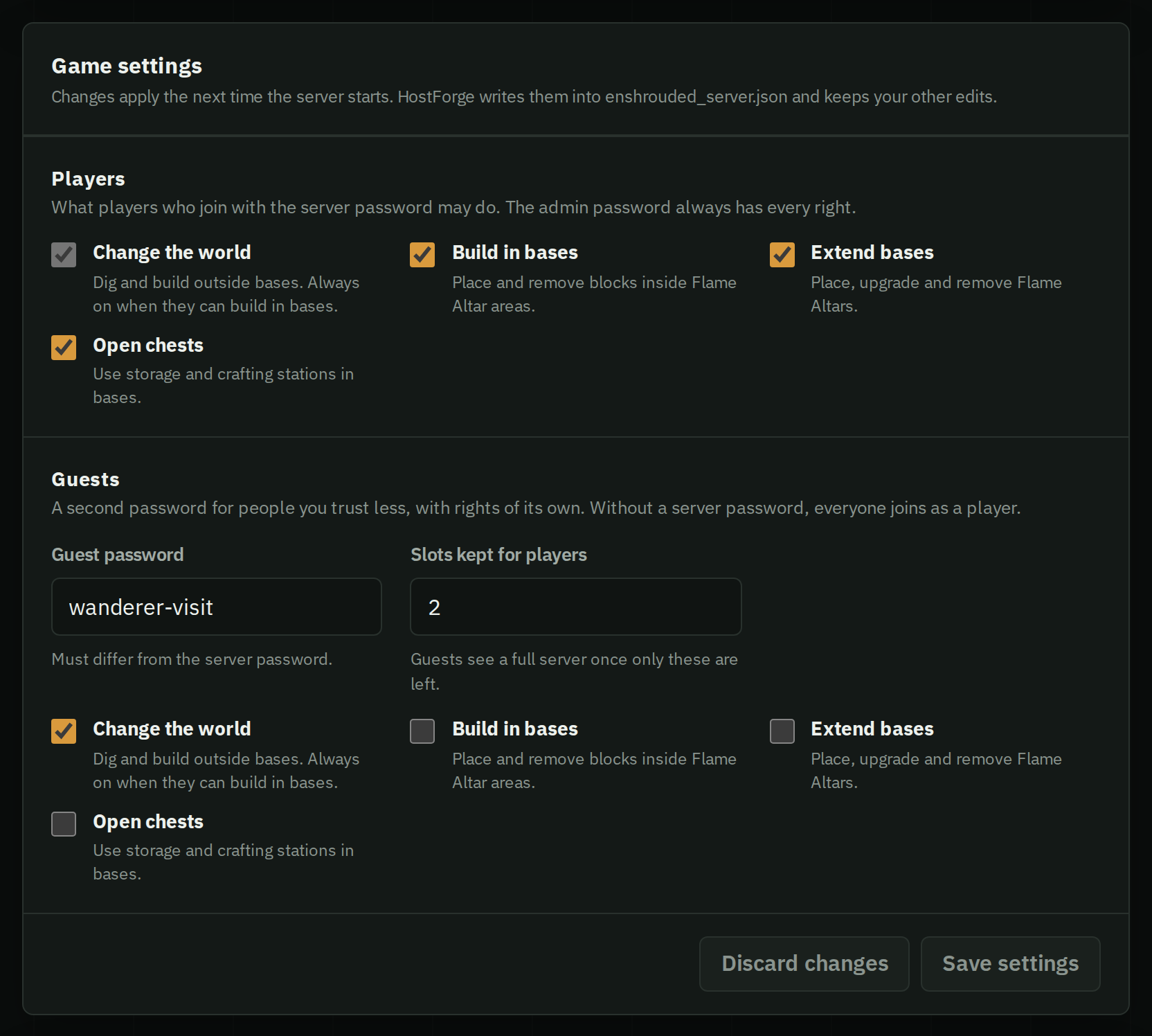
HostForge sets up the roles for you. Players join with the server password, you join with the admin password to kick and ban, and an optional guest password gives guests rights of their own. Tick what players and guests may do, and keep slots free for players.
More settings in every Enshrouded setting explained.